Login to COM
- Go to https://com.nycdot.io
- Click on the blue-colored login button and follow the instructions.
Go to Calendar
- Hover on the left menu and select the calendar.
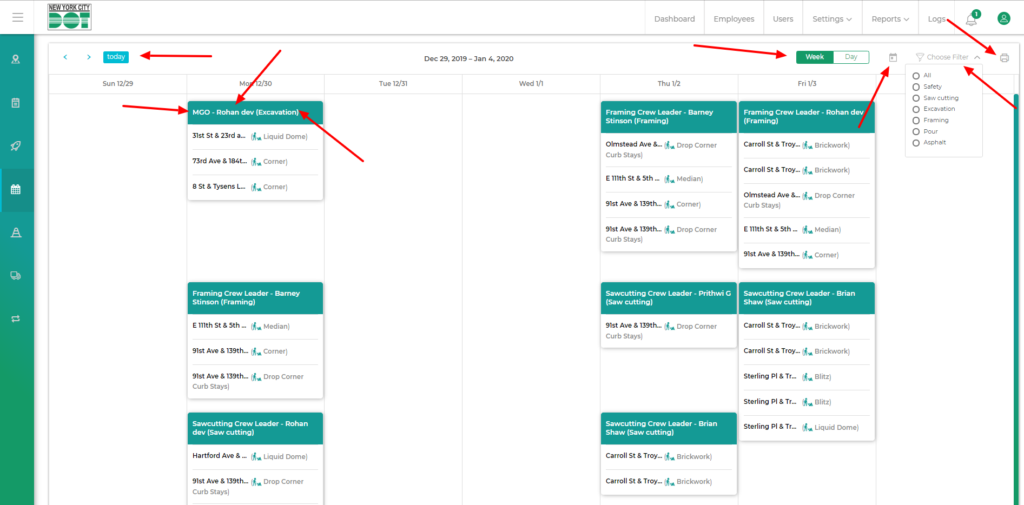
- On the calendar, you will be able to see all the crews in a card format.
- The crews will show the name of the approver, elements assigned and the work type. (See Figure 1)
Week/Day View
- You can toggle on the week/day tab on the top right to view the calendar day or week wise.
- You can also view the data for a particular day by clicking on the block for the desired day itself.
- The blue today button on the top left when clicked will show cards for the present day when in day view and the present week when in week view. (See Figure 1)
- If the week tab is on and you click on the blue arrows on the top left, you will be able to toggle weeks. The same thing will happen if the day tab is selected. Only that time days will be toggled.
- You can also manually select any day from the date icon on the top right. It would show you the entire week of the selected day if the week view is on and just the data for the selected day if the day view is on.
- You can print the data of this screen by using the print icon of the extreme top right of the screen
- You can also filter the data according to crew types. So if you choose all, then all crew types would be shown but if you choose specific crew types then only your chosen crew types would be shown.
- If framing user logs in and selects framing from filter then he will see framing crews from only his yard but if he selects non framing crews from filter then he will see all non framing crews. (Example, all saw cutting crews if he has selected saw cutting, all safety crews if he has selected safety and so on)
- If a non framing user logs in and he toggles through the filter then he will see all crews with respect to the selected crew type. (Example, all framing crews if framing is selected, all saw cutting crews if saw cutting is selected and so on)
- By default, all the user types will see all crews.